Build a Local RAG Pipeline You Fully Control
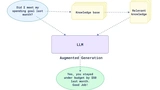
This course takes Retrieval-Augmented Generation from concept to a complete, self-hosted application. You build a pipeline that reads PDF files, breaks their text into chunks, stores the results as vectors in Elasticsearch, retrieves the most relevant passages, and generates grounded answers using the Mistral model — running entirely locally through Ollama.
The Working Example
Everything is built around one concrete scenario: searching a set of resumes to answer questions like 'who has worked in Ireland?' or 'who has experience with Apache Spark?' — a practical way to see retrieval accuracy in action.
The Stack You'll Assemble
- FastAPI for uploading and processing PDFs into structured, chunked, embedded text
- Elasticsearch for indexing vectors alongside metadata, plus Kibana for inspecting the results
- Streamlit for a chat interface, with a debug mode that shows which chunks fed each answer
- Docker Compose to tie the whole containerized setup together
Where RAG Breaks Down
The course doesn't stop at a working demo — it also digs into where RAG struggles, such as accuracy gaps, incomplete retrieval, and model hallucinations, and how to design around those issues for production.
What You Will Learn
From Search to RAG
You will expand your knowledge of semantic search and learn to apply it for RAG: starting with retrieving relevant parts, then generating substantiated responses based on them. You'll discover how LlamaIndex integrates your data with LLM, and why the size and overlap of "chunks" are important for accuracy.
Creating a Pipeline
With FastAPI, you will implement uploading and processing PDFs: extracting text, formatting JSON, splitting, creating embeddings, and indexing in Elasticsearch, with minimal boilerplate code thanks to LlamaIndex.
Working with Elasticsearch
You will create an index for resumes with vectors and metadata. You'll learn to distinguish between vector search and keyword search, understand how vector fields are stored, and how to explore documents and results through Kibana.
Interface on Streamlit
You will create a simple chat interface on Streamlit for natural language interaction. Enable debug mode to see which fragments were used for responses and apply metadata (e.g., filtering by name) to enhance accuracy.
Processing and Formatting JSON
You will extract text from PDFs using PyMuPDF, then create a neat JSON via Ollama (Mistral), preserving structure and characters. You'll master handling formatting errors and methods for reliable prompt engineering.
Improving Response Quality
You will study practical techniques to increase accuracy:
- adjusting chunk sizes and overlaps, top-K sampling;
- adding metadata (role, skills, location) for hybrid filters;
- experimenting with embedding models and prompts;
- using structured responses (e.g., JSON lists).
Docker Environment
You will assemble the entire stack in Docker Compose: FastAPI, Elasticsearch, Kibana, Streamlit, and Ollama (Mistral), to deploy the system locally with a predictable configuration.
Bonus: Production Patterns
You will learn how to scale the prototype to production level:
- store uploads in a data lake (e.g., S3) and process them through queues (Kafka/SQS);
- automatically scale workers for chunking and embeddings;
- switch LLM backends (e.g., Bedrock or OpenAI) via a unified API;
- store chat history in MongoDB/Postgres and replace Streamlit with a React/Next.js interface.